
Ultimate Improvement of Web Page Visibility: 15 Powerful Solutions You Must Try!


Did you know that over 90% of webpages receive zero organic traffic from Google? In a crowded digital world, simply having a website isn’t enough – if your pages aren’t visible on search engines, potential customers can’t find you.
Imagine drastically boosting your site’s visibility so that it stands out from the 90%, drawing in more clicks and conversions. This guide will reveal 15 proven solutions to help you dominate search results and attract the audience you deserve.
By mastering these strategies – from SEO fundamentals to advanced tactics – you can drive steady organic traffic, build authority, and turn your website into a magnet for opportunities.
Ready to rise above the competition and skyrocket your web page visibility? Read on to discover the powerful steps that will make it happen!
Content Overview:
What Is Search Engine Visibility?
“Search engine visibility” refers to how easily your web pages can be found and how high they rank on search engine results pages (SERPs) for relevant queries. High visibility means your site appears frequently and prominently (ideally on the first page) when users search keywords related to your business.
The higher your visibility, the more organic traffic and potential customers you can attract. It’s essentially a measure of your online presence in search engines.
In practical terms, visibility is influenced by your site’s rankings for various keywords, click-through rates, and how often your pages show up in searches. For example, if you rank on page 1 for many high-volume keywords, you have strong visibility; if you’re buried on page 5, your visibility is low.
Improving visibility is critical because search engines drive a huge share of web traffic – in fact, search engines account for roughly 68% of all trackable website traffic. Higher visibility means more impressions, more clicks, and ultimately more business.
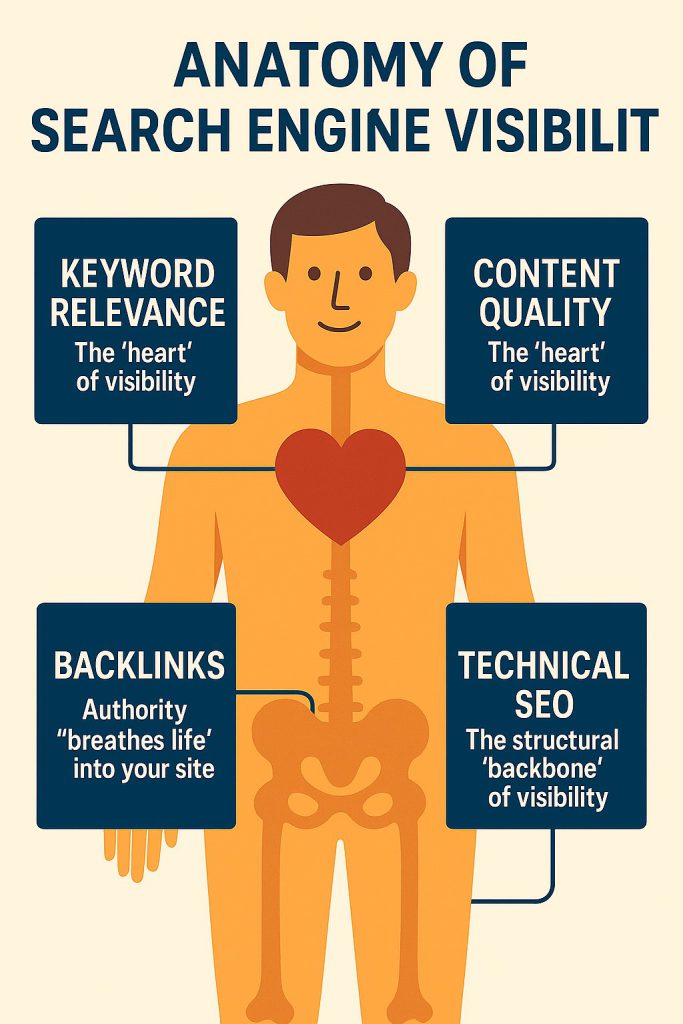
Remember, visibility is the result of effective SEO: all the optimizations you do (on-page, technical, content, etc.) are means to increase how often and how high your site appears in search results. Now, let’s dive into the proven steps and strategies to master the improvement of your web page visibility.
Master the Improvement of Web Page Visibility with These 15 Proven Steps and Strategies
Achieving top-notch visibility isn’t an overnight task – but by following these 15 steps, you’ll cover all the bases needed to get your pages noticed. From planning a solid foundation to leveraging advanced tactics, these solutions address every aspect of SEO and online presence. Let’s break down each one.
1. Set a Clear SEO Strategy
The first step to improving visibility is having a clear SEO strategy in place. Think of this as your roadmap for ranking success. Define your goals: do you want to increase overall traffic, get more leads, build brand awareness, or all of the above?
Having specific objectives will guide your efforts and help measure progress. Align your SEO plan with your business goals – for example, if you aim to boost sales of a product, your strategy might focus on ranking for that product’s keywords and optimizing its landing page.
Start by researching your target audience and what they search for. Understanding user intent is crucial – if you know what problems or needs your audience has, you can tailor your content and keywords to meet them.
Next, perform an SEO audit of your website to see where you stand: evaluate your current rankings, identify technical issues, analyze competitors, and find content gaps. Use this to create an action plan.
Your strategy should encompass all major SEO components: on-page optimization, content creation, technical fixes, link building, and user experience improvements. It’s often helpful to document this plan and prioritize tasks (for instance, fix critical technical issues first, then work on content, etc.).
Be sure to set Key Performance Indicators (KPIs) – such as organic traffic, keyword rankings, or conversion rates – so you can track results over time.
Importantly, commit to an ongoing SEO management process rather than a one-time project. Search algorithms and competitive landscapes change, so your strategy should be revisited and adjusted regularly.
Many successful businesses either hire an SEO manager or invest time each month in reviewing analytics and refining their approach. By setting a clear, data-driven strategy and sticking to it, you establish the foundation needed for all the following visibility-boosting steps.
(Internal Note: Want to delve deeper into managing an SEO strategy? Check out our guide on SEO management, which covers how to plan and execute SEO for sustained success.)
2. Keyword Optimization
Keywords are the building blocks of search visibility – they’re the terms your target customers type into Google. Keyword optimization means researching, selecting, and using the right keywords on your pages so that search engines can tell your content is relevant to those queries.
It’s not about stuffing as many keywords as possible, but about choosing the best keywords and placing them strategically.
Begin with keyword research to find out what phrases people use when looking for your products, services, or information in your niche. Tools like Google Keyword Planner, Ahrefs, or Semrush are invaluable for this. Aim to identify a mix of:
- High-volume keywords – popular search terms that can bring significant traffic (but are often competitive).
- Long-tail keywords – more specific, longer phrases (e.g., “how to improve local coffee shop website visibility”) that have lower search volume but often higher conversion intent and easier ranking potential.
- Buyer-intent keywords – queries that indicate someone is ready to act (e.g., “buy running shoes online” or “best SEO software review”).
Once you have a list, evaluate the competition and relevance of each term. Focus on keywords that match the intent of your content and where you can realistically rank.
For example, a new site might not rank for “laptops” (too broad and competitive), but could rank for “best budget laptops for students 2025” – a longer, more specific term.
After selecting target keywords, integrate them into your site content:
- On your pages: Use the main keyword in the title tag, meta description, URL, and prominently in the page heading (H1) if possible.
- Within content: Mention the keyword naturally in the first paragraph and a few times throughout the text, especially in subheadings (H2/H3) where relevant. Include variations and synonyms to cover semantic relevance.
- Image alt text: If you have images, use descriptive file names and alt attributes that include keywords (when appropriate) – this can help with image search visibility and accessibility.
Be careful to avoid keyword stuffing (overusing keywords to the point it feels unnatural or spammy).
Google’s algorithms are very sophisticated – they understand context and related terms, so writing naturally for your audience tends to work better than obsessively repeating a phrase. The goal is to signal what your page is about while still providing value to readers.
Monitoring is key: track how your pages rank for target keywords and how much traffic those terms bring. Over time, you might refine your keyword list – dropping ones that aren’t performing or expanding into new related keywords as trends change.
Remember, keywords connect you to your audience’s searches, so optimizing for them is fundamental to improving your web page visibility.
3. Content Creation & Optimization
High-quality content is the engine that drives search visibility. Google’s mission is to satisfy user queries, so it favors content that is relevant, authoritative, and fresh. By creating excellent content and optimizing it for both readers and search engines, you significantly boost your chances of ranking well.
Start with a content strategy based on your keyword research and user needs. Identify topics that your audience cares about and that align with your business expertise.
Then create content that is comprehensive, useful, and engaging. This could be in the form of blog posts, how-to guides, infographics, videos, product pages – whatever format best delivers value for the topic at hand.
Key considerations for creating and optimizing content:
- Depth and quality: Cover the topic in sufficient depth to answer the user’s query completely. Thin or superficial content won’t cut it. If you’re writing a guide on, say, improving website speed, include all the major subtopics (why speed matters, how to test it, techniques to optimize images, caching, etc.). Aim to be the best answer on the web for that query. Many top-ranking pages have thorough content averaging around 1,500 words or more, but there’s no magic number – just ensure every word is valuable.
- Keyword usage: Optimize your content around the primary keyword and related terms. This means using the keyword in the title, headings, and throughout the text (as discussed in the previous section). But also incorporate LSI (latent semantic indexing) keywords – these are naturally related phrases that search engines expect to see in high-quality content on that topic. For instance, an article about “electric cars” might naturally mention batteries, charging, Tesla, range, etc. Such terms help search algorithms confirm the relevance of your content.
- Readability and engagement: Write in a clear, reader-friendly style. Break up text with headings, bullet points, and images to avoid “wall of text” syndrome. Keep paragraphs and sentences on the shorter side for easy reading. The longer visitors stay and engage with your content, the better the signal to Google that it’s useful. Incorporating visuals, examples, or even interactive elements can make your content more engaging.
- Include fresh and updated info: Outdated content can hurt your visibility. Whenever possible, use up-to-date statistics, references, and examples. If you have older pages, consider updating them regularly. Search engines favor fresh content, especially for topics where information changes over time. A simple content audit every few months to refresh any stale articles (adding new insights, replacing old data, etc.) can give you a ranking boost.
- Optimize meta tags: Even the best content won’t rank or get clicks if its title tag and meta description aren’t enticing. Craft a compelling title (within ~60 characters) that includes your keyword and piques interest. Write a meta description (~155 characters) that summarizes the page and includes a call-to-action or value proposition – this can improve your click-through rate on SERPs, which in turn can improve rankings. (Note: Google often rewrites meta descriptions, but it’s still important to provide one.)
Finally, remember that content optimization isn’t a one-off task. Use analytics to see how each content piece performs. Which pages have high bounce rates? Which aren’t ranking as expected?
Often, a bit of tweaking can work wonders – adding a missing subtopic, improving the introduction, or incorporating a relevant keyword you initially overlooked can raise a page’s visibility.
In fact, updating and improving existing content is one of the fastest ways to gain traffic, compared to writing something entirely new.
4. On-Page SEO Techniques
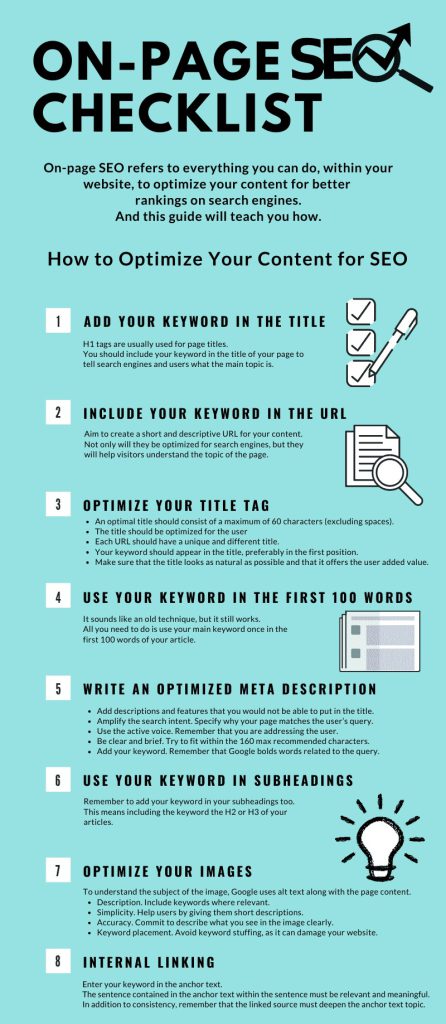
On-page SEO refers to optimizing the elements on your webpage itself to make it search-engine friendly and relevant for target keywords. We’ve touched on content and keywords, which are core parts of on-page SEO, but now let’s focus on other critical on-page elements and best practices.
These techniques help search engines crawl and interpret your pages correctly, and also improve user experience – both of which can boost your rankings.
Here are the key on-page factors to check and optimize:
- Title Tags: Ensure every page has a unique, descriptive title tag that includes the primary keyword. This is usually the headline that appears in search results. For example, instead of a generic title like “Services – ABC Corp”, use something like “Digital Marketing Services – ABC Corp | SEO, PPC, Social Media”. Keep it around 50-60 characters so it doesn’t truncate.
- Meta Descriptions: While not a direct ranking factor, meta descriptions influence click-through rates. Write a concise summary (150-160 characters) of the page that entices users to click. Include a keyword and a call-to-action if appropriate (e.g., “Learn how to improve your site’s SEO with our step-by-step guide.”).
- Headings (H1, H2, H3): Use heading tags to structure your content hierarchically. The H1 is typically the page title (and should include the main keyword). Break content into sections with H2 and H3 subheadings as needed. Search engines use headings to understand content structure and relevance, and users skim them to navigate your page – so they should be informative and keyword-conscious.
- URL Structure: Use clean, readable URLs that include keywords and reflect your content. For example, “
.../blog/web-page-visibility-tips” is better than “.../blog/id=123?ref=456“. Shorter URLs tend to rank better and are easier for users to remember. Avoid using excessive parameters or auto-generated gibberish. Also, ensure consistency (all lowercase, words separated by hyphens). - Internal Linking: Link to relevant pages within your site. Internal links help spread link equity and guide search engine crawlers to discover your content. They also keep users engaged by pointing them to related information. For instance, if you mention technical SEO, you might link to a detailed technical SEO checklist on your site. Be mindful to use descriptive anchor text (e.g., “technical SEO checklist” as the clickable text, rather than “click here”). Effective internal linking not only improves navigation but also signals to Google which pages are most important and how your content is related.
- Alt Text for Images: For every image on your page, use an
altattribute describing the image. Not only does this aid accessibility for visually impaired users, but it also gives search engines information about the image’s content (potentially helping your images show up in Google Image search and adding to page relevance). For example:<img src="analytics-dashboard.png" alt="Website analytics dashboard showing traffic increase">. - Schema Markup (Structured Data): Consider adding schema markup to your pages where relevant. Schema is code (using JSON-LD or microdata) that helps search engines understand the context of your content and can enable rich snippets (special SERP features). For example, marking up an address with LocalBusiness schema can enhance your local SEO listing, or using FAQ schema on a Q&A section can get you a rich result on SERPs. While not all sites need schema, implementing it can give you an edge for SERP visibility (more on this later in “SERP Optimization”).
- Page Content Optimization: We discussed content in step 3, but as an on-page checklist item, always double-check that your page’s main copy includes the target keyword (ideally in the first 100 words) and related terms, and that it delivers on what the title promises. If your page is about “15 visibility tips”, ensure it indeed has those tips and more info beyond that. This alignment of keyword -> title -> content should be tight.
- Outbound Links: Linking out to authoritative sources where appropriate can be beneficial. It shows that you’re citing reputable information, which can indirectly boost your page’s credibility (and thus visibility). For example, if you reference a statistic or a definition, linking to the source (perhaps a study or a known industry site) is good practice. Just be sure outbound links open in a new tab (so you don’t send users away permanently) and that you don’t overdo it to the point of distracting from your content.
By systematically applying these on-page SEO techniques to each page, you make it easier for search engines to understand and trust your content – which leads to higher visibility.
It also creates a better experience for users, which can increase engagement metrics like time on page and reduce bounce rate (positive signals for SEO). On-page SEO is often one of the simplest to control (compared to external factors), so make sure every page on your site is as optimized as it can be.
5. Technical SEO & Performance
Even the best content won’t rank if your site has serious technical issues. Technical SEO involves optimizing the behind-the-scenes aspects of your website so that search engine bots can efficiently crawl and index your pages, and users enjoy a fast, secure experience.
In many ways, it’s the foundation that supports all your other SEO efforts. Key areas to focus on include site speed, indexing, site architecture, and more.
Here are the crucial technical factors to address for maximum visibility:
- Website Speed & Performance: A slow site not only frustrates users (leading many to leave) but also hurts your rankings. Google has made it clear that page speed is a ranking factor, particularly with the advent of Core Web Vitals. Optimize your site to load quickly:
- Compress and properly size your images (large image files are common speed killers).
- Minify your CSS, JavaScript, and HTML (remove unnecessary characters, comments, and whitespace).
- Leverage browser caching so returning visitors load pages faster.
- Consider using a Content Delivery Network (CDN) to serve your content from servers closest to your users.
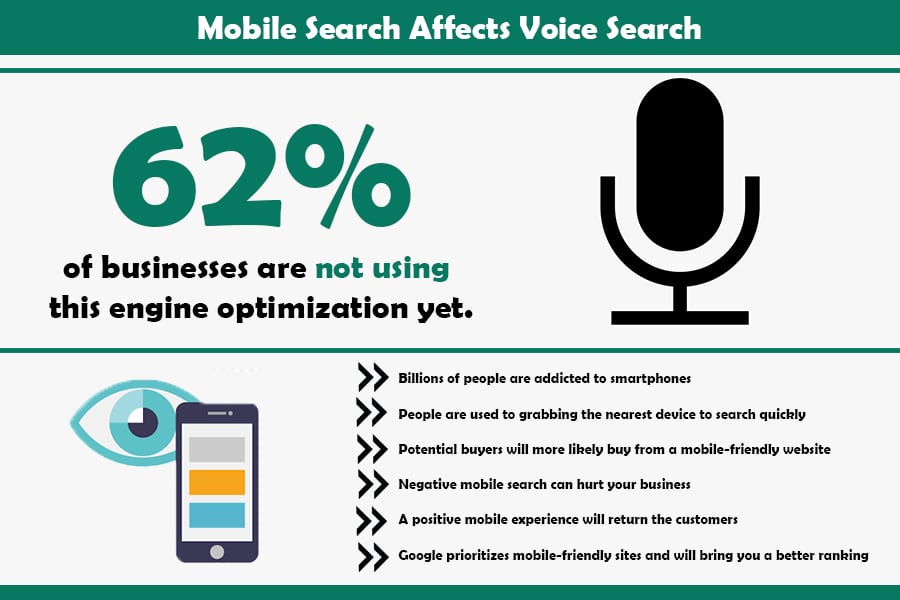
- Mobile-Friendliness (Mobile Optimization): With the majority of searches now happening on mobile devices, Google uses mobile-first indexing, meaning it predominantly uses the mobile version of your site for ranking and indexing. Ensure your website is fully responsive (adapts to different screen sizes) and offers a great user experience on phones and tablets. This includes having legible text without zooming, buttons and links that are easy to tap, and content that isn’t cut off. Run your site through Google’s Mobile-Friendly Test tool for feedback. If your site isn’t mobile-friendly, its visibility will suffer greatly, as Google prioritizes mobile-friendly websites in results.
- XML Sitemap: Create an XML sitemap listing all important pages on your site, and submit it to Google Search Console (and Bing Webmaster Tools). The sitemap acts as a roadmap for search engine crawlers, ensuring they don’t miss any pages. Most CMS platforms can generate a sitemap automatically (or you can use SEO plugins). Keep it updated as you add/remove pages.
- Robots.txt: Use a
robots.txtfile to guide crawlers on which parts of your site to crawl or avoid. Be cautious: a misconfiguration could accidentally block important content. Generally, allow all unless there’s a good reason to disallow (like admin or duplicate pages). Check Google Search Console for any crawl errors or warnings related to your robots.txt. - Indexing & Crawl Errors: Regularly check Google Search Console for any indexing issues. Fix broken links (404 errors) either by removing them or setting up proper 301 redirects to relevant pages. Redirect old URLs to new ones if content has moved (to preserve any SEO value). Make sure you’re not accidentally blocking pages with
noindextags or meta directives (unless intended). Essentially, you want all pages that should rank to be properly indexed by search engines. - Site Architecture & URL Structure: Organize your site logically. A clear hierarchy (with categories, subcategories, etc.) not only helps users navigate but also assists crawlers in understanding your site’s structure. Try to keep important content within a few clicks of the homepage. Use breadcrumb navigation if appropriate, which can appear in search results and further clarify site structure.
- HTTPS (Site Security): Serve your site over HTTPS (secure protocol). Google gives a slight ranking boost to HTTPS sites, and users are conditioned to trust them more (browsers will flag “Not secure” on sites without HTTPS, which can scare visitors away). Getting an SSL certificate is straightforward and often free (via Let’s Encrypt). Ensure all pages redirect from http:// to https:// to avoid duplicate content issues between protocols.
- Core Web Vitals: These are a set of user experience metrics that Google uses as ranking signals. They include Largest Contentful Paint (loading performance), First Input Delay (interactivity), and Cumulative Layout Shift (visual stability). Optimize for these by, respectively: ensuring the main content loads quickly, scripts don’t delay interaction, and the layout doesn’t shift unexpectedly due to images/ads loading. Passing Core Web Vitals can positively impact visibility, especially since Google’s Page Experience updates.
- Structured Data & Rich Results: As mentioned under on-page SEO, adding structured data (schema) can improve how your listing appears (though it doesn’t directly boost rankings, it can increase click-through rates if you get rich snippets). For technical SEO, ensure your structured data (if any) is correctly implemented – test it with Google’s Rich Results Test tool to catch errors.
Addressing technical SEO might seem daunting, especially if you’re not a developer. But many improvements (like image compression or enabling HTTPS) are one-time fixes that yield lasting benefits.
The goal is to eliminate any technical bottlenecks that could prevent your amazing content from being discovered, crawled, or delivered quickly to users. A technically sound site is the foundation for sustainable search visibility.
One way to approach this is to think: if a search engine were a user, would it have any trouble accessing or understanding my site? By making things smooth for the bots, you inherently make it better for human users, too.
Invest the time to get your technical SEO and performance in shape – it pays off with higher rankings, better user retention, and even conversion lifts (users love fast, hassle-free websites).
6. Mobile Optimization
Optimizing for mobile is so important today that it merits its own focus beyond general technical tweaks. Mobile optimization means ensuring your website looks good and works well on mobile devices, and that you’re catering to the mobile user’s context and behavior.
With more than half of all web traffic coming from mobile devices and Google’s switch to mobile-first indexing, a mobile-centric approach is non-negotiable for web page visibility.
Key steps to excel at mobile optimization:
- Responsive Design: Use responsive web design so that your site’s layout and content automatically adjust to fit different screen sizes. On a responsive site, elements like images and text blocks scale, and navigation menus often collapse into a mobile-friendly format. Most modern website themes/templates are responsive, but always test on multiple devices or use online tools to see how your pages render on common phone models.
- Simplified Navigation: Mobile screens are smaller, and users navigate with touch. Simplify your menus and make buttons large enough to tap easily. A common best practice is using a “hamburger” icon that expands a vertical menu for easy one-handed use. Also, ensure that important links or call-to-action buttons aren’t buried – users should not have to zoom or scroll horizontally.
- Avoid Intrusive Interstitials: Google may penalize sites that show intrusive pop-ups or overlays on mobile, especially if they cover content (like a huge signup form that appears immediately). If you use pop-ups, make them as user-friendly as possible (easy to close, and perhaps timed or sized appropriately).
- Optimize Mobile Page Speed: Mobile users often have slower connections, so page speed is even more critical. All the performance tips from Technical SEO (image compression, minification, etc.) doubly apply for mobile. Additionally, consider using modern techniques like AMP (Accelerated Mobile Pages) for content-heavy pages – AMP is a framework that creates stripped-down versions of pages for lightning-fast loading on mobile (though implement carefully as it has specific limitations).
- Touch-Friendly Design: Ensure that links and buttons are spaced well apart to avoid accidental taps. Use adequate padding around clickable elements. And avoid hover-dependent features (since there’s no hover on touch screens) – for example, a dropdown menu should open on tap, not on hover.
- Mobile Content Prioritization: Think about the essentials first for mobile users. Mobile screens may show less content at a glance, so put key information (like your value proposition or a headline) towards the top. Large blocks of text can overwhelm a mobile user; consider breaking content into accordion sections (expandable/collapsible) for easier digestion on mobile.
- Local and Voice Considerations: Many mobile searches are local (like “cafes near me”), and many use voice input (with more conversational queries). Ensure your mobile strategy includes local SEO if relevant – for example, your site should prominently display your address/phone and be integrated with Google Maps. Also, optimizing for voice search might involve targeting question-based keywords or natural language phrases (often done in your content, FAQs, or blog posts).
- Testing on Real Devices: Emulators are helpful, but nothing beats testing your website on actual smartphones and tablets. See how quickly it loads on a typical mobile network (3G/4G). Is the text readable without zooming? Do videos play properly? Is the checkout process (if you have one) smooth on mobile? Use Google’s Mobile-Friendly Test and PageSpeed Insights, but also rely on real user feedback if you can get it.
7. Link Building and Authority
In the eyes of search engines, backlinks (links from other websites to yours) serve as votes of confidence and authority. If content is king, backlinks are the queen who helps the king rule.
Building a strong backlink profile is one of the most impactful ways to improve your web page visibility, especially for competitive keywords. When reputable sites link to your content, Google interprets that as a signal of trustworthiness and relevance, often leading to higher rankings.
However, not all links are equal. Here’s how to approach link building strategically:
- Create Link-Worthy Content: The foundation of earning backlinks is having content that people want to link to. This could be a comprehensive guide, original research with data, an insightful blog post, an infographic (people love sharing infographics), a tool/calculator, or anything uniquely valuable. When your content is a great resource, it naturally attracts links over time (this is often called “earning” links rather than manually building them).
- Outreach and Relationship Building: Don’t just wait for links – actively promote your content. Reach out to other websites or bloggers in your niche who might find your content relevant. For example, if you published “15 Powerful Solutions to Improve Web Page Visibility,” you might reach out to a marketing blog that has an article on SEO tips, suggesting they could reference or share your piece. Personalize your outreach messages and highlight what’s in it for them/their audience. Building genuine relationships in your industry (through networking on LinkedIn, Twitter, forums, etc.) can lead to more linking opportunities.
- Guest Posting: Writing guest articles for other websites in your industry can be a win-win: they get quality content, and you often get to include a link back to your site (in the content or author bio). Target reputable sites where your contributions will be valued by readers. Make sure any guest post is high-quality and not overtly self-promotional – the goal is to provide value and subtly gain a link. Note: Always abide by any guest post guidelines, and avoid low-quality “guest blogging farms” (sites that exist solely for link drops) as those links carry little weight.
- Directories and Citations: For local businesses, getting listed in relevant online directories (Google Business Profile, Yelp, industry-specific directories) not only helps local SEO but also provides backlinks or citations (mentions of your Name/Address/Phone). Even for non-local sites, there are high-quality directories or resource pages where listing your site can be beneficial. Focus on reputable, human-curated directories (avoid spammy link directories).
- Broken Link Building: This is a savvy tactic where you find broken links on other sites (for example, a resource page in your niche with dead links) and suggest your content as a replacement. You use tools or check manually for 404 errors on external pages, then politely reach out to the webmaster to inform them and recommend your relevant link. It provides them value (fixing a broken link), and you potentially gain a backlink.
- Skyscraper Technique: Coined by SEO expert Brian Dean, this involves finding popular content with lots of links, creating an even better version of that content, and then reaching out to those linking sites to suggest they link to your superior resource. It leverages proven link-worthy topics by taking them up a notch.
- Social Sharing and PR: While social media links (Facebook, Twitter, etc.) are typically “nofollow” (not passing direct SEO value), a strong content promotion on social can indirectly lead to backlinks. The more people who see and share your content, the more likely it will reach someone who might blog about it or include it in an article. Similarly, digital PR – like pitching your content story to journalists or getting featured in the press – can result in high-authority news sites linking to you.
- Monitor and Disavow Bad Links: As you build good links, keep an eye on your backlink profile (using tools like Google Search Console, Ahrefs, or SEMrush). Sometimes, your site may accumulate spammy or low-quality links (perhaps scraped content or unethical sites). While Google is pretty good at ignoring those, if you see a lot of suspicious links, you can use the Disavow Tool to tell Google not to count them. This is more of a protective measure; focus on adding quality links rather than worrying too much about bad ones, unless there’s a clear negative SEO attack.
It’s important to note that quality matters far more than quantity when it comes to backlinks. One link from a highly trusted, authoritative site (say, a famous news site or a .edu domain) can outweigh dozens of links from small, new blogs.
Also, links that are contextually relevant (coming from content related to your topic) carry more weight than random links.
Be cautious with any manipulative link-building schemes (buying links, link exchanges at scale, private blog networks).
Google’s algorithms (and manual reviewers) can penalize websites for engaging in unnatural linking practices. Always aim for earned or editorial links – those given by choice because your content deserved it.
Building authority through backlinks is a gradual process, but its impact on visibility is profound. As your site’s backlink profile grows with quality references, your domain’s authority increases, boosting the ranking potential of all your pages.
In SEO, content and backlinks work hand in hand: great content makes others want to link to you, and strong backlinks make Google more confident in showing your great content. Invest in both, and you’ll steadily climb the visibility ladder.
8. Content Distribution
Creating excellent content is crucial, but distributing that content effectively is just as important for visibility. Content distribution means actively sharing and promoting your content across various channels to reach a wider audience.
The more people who see your content, the more likely it is to attract links, social shares, and direct traffic – all of which can improve search visibility either directly or indirectly. Think of it as amplifying your content’s reach beyond just publishing on your website.
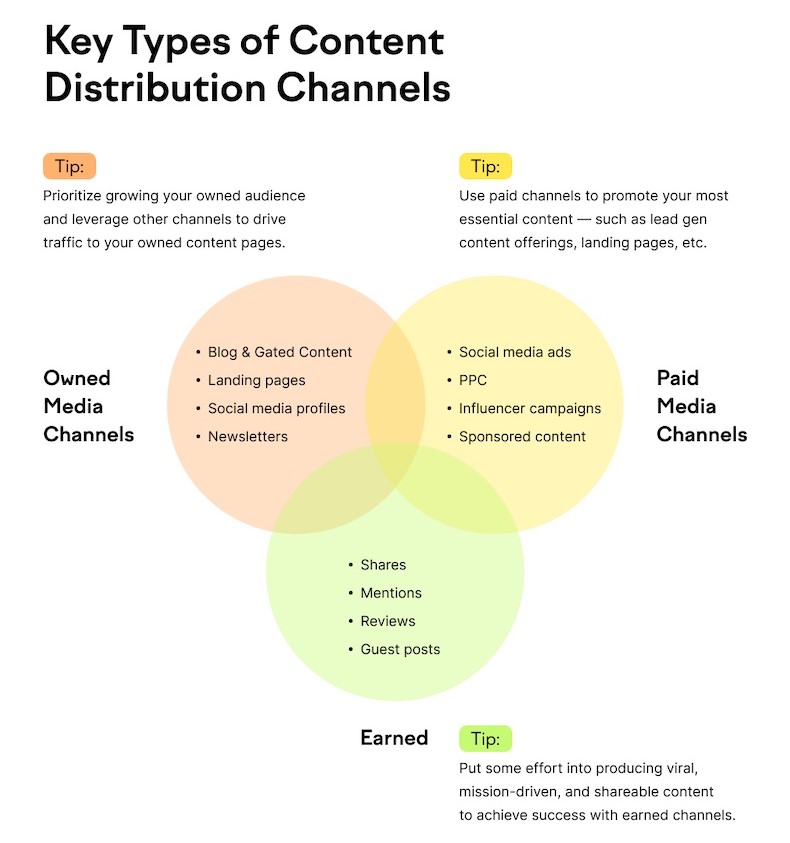
There are three main categories of distribution channels: owned, earned, and paid:
- Owned Media: These are channels you control. This includes your social media profiles (e.g., posting your new blog on your company’s Twitter, Facebook, LinkedIn, Instagram), your email newsletters, your website’s blog itself, or a YouTube channel if you have one. Use these channels to regularly broadcast your content to your followers or subscribers. For instance, each time you publish a new article or page, share it on your social platforms with a catchy caption and relevant hashtags. If you have an email list, include your latest content in a weekly or monthly roundup email. On your site, you can use internal banners or recommendation widgets to highlight new or important content.
- Earned Media: This is exposure you gain from others sharing your content or mentioning it – essentially word-of-mouth online. It includes social shares by users, mentions by influencers, or features on other websites (like a blogger linking to your article in their post, or someone discussing your infographic on a forum). While you don’t control these channels directly, you can encourage earned media by making it easy to share your content (add social sharing buttons, embed codes for infographics, etc.) and by reaching out to influencers or communities who might find your content valuable. Engaging with industry communities (like relevant Reddit threads, Quora answers, or Slack/Discord groups) in a genuine way can also help – for example, if someone asks a question your content addresses, you can share it as a resource (without being spammy).
- Paid Media: Sometimes, a little boost via paid promotion can kickstart your content visibility. This includes techniques like social media advertising (promote your post on Facebook or Twitter to a targeted audience), content discovery platforms (like Outbrain or Taboola, which show your articles as “recommended” on other sites), or paid search ads (though generally you’d advertise a product/service page more than a blog post). Paid promotion can drive initial traffic to your content, which can lead to more organic sharing and linking if the content resonates. Just be mindful of cost and ensure you target the right audience so the traffic is relevant.
Additional tips for effective content distribution:
- Timing and Frequency: Share your content when your audience is most active. Perhaps your Twitter followers engage most in the mornings, or your email newsletter gets higher opens on Tuesdays. Use analytics to guide timing. Also, don’t be afraid to reshare evergreen content periodically (e.g., reshuffle older but still relevant posts through your social feeds on occasion), especially if you gain new followers over time who haven’t seen it.
- Tailor the Message to the Platform: Don’t just drop a link everywhere with the same caption. Craft platform-specific teasers. For LinkedIn, a more professional angle might work; for Instagram, maybe a striking image from your post with a concise caption; for Twitter, a catchy headline and perhaps a statistic from the content can lure clicks. Each platform has its culture and best practices.
- Engage with the Community: When you share content, stick around to engage with the comments or discussions it generates. If someone asks a question on your Facebook post about the content, answer it. If your article is discussed on a forum, consider chiming in (thanking people for feedback or clarifying something). This builds goodwill and encourages more people to view you as an authority worth listening to.
- Repurpose Content: Distribution can also mean presenting your content in different formats to reach new audiences. For example, turn a blog post into a short video summary or a slide deck (and upload to YouTube or SlideShare). Or create an infographic out of key points (which can be shared on Pinterest or infographic sites). Repurposing helps you cover channels where your original format might not reach.
- Monitor and Adjust: Track how your content performs across channels. Perhaps you find that a certain LinkedIn group drives a lot of traffic, whereas Reddit didn’t. Focus more on what works, but also remember that building an audience on a channel can take time. Google Analytics UTM parameters can help tag your links to see which source is driving visits and engagement.
Content distribution extends the lifespan of your content beyond the initial publish date. By proactively pushing it out and circulating it in the digital world, you attract more visitors and create more entry points for users to find you (not to mention the secondary SEO benefits of more visibility leading to more backlinks).
9. Local SEO
If your business or website targets a specific geographic area, then Local SEO is essential for improving your visibility to nearby searchers.
Local SEO focuses on optimizing your online presence to attract local customers – people searching for products or services in a specific location (often including phrases like “near me” or the city name in their queries).
Even if those phrases aren’t explicitly used, search engines often infer local intent (for example, searching “coffee shop” will likely show local coffee shops if you’re in a town).
Key strategies for boosting local page visibility:
- Google Business Profile: Claim and optimize your Google Business Profile (formerly Google My Business). This is absolutely critical – it’s what allows your business to show up in Google Maps and the local 3-pack (the map and 3 listings that often appear above organic results for local searches). Fill out your profile completely: business name (should reflect your real-world name), address, phone number, website, hours, and category. Add photos and even posts/updates. Encourage customers to leave reviews on your Google listing – reviews and ratings not only influence consumer trust but also are a local ranking factor.
- NAP Consistency: Ensure your Name, Address, Phone number (NAP) is consistent across all online platforms – your website, directories, social media profiles, etc. Search engines cross-verify this info. Small discrepancies (like “Street” vs “St.” or old phone numbers) can cause confusion or diluted credit. Include your business address and phone number visibly on your website (like in the footer or a Contact Us page). Using schema markup for your address on your site can further help search engines identify your location details.
- Local Keywords & Content: Incorporate local keywords in your site content and meta tags. This could mean including your city or region name in title tags, headings, and within your copy where it makes sense. For instance, “Award-Winning Plumber in Denver, CO” as a title tag immediately signals location relevance. If you serve multiple areas, consider creating dedicated pages for each major location (with unique, useful content on each, not just duplicate pages swapping city names). Also, creating local content (like blog posts about local events or news related to your niche) can boost local relevance.
- Citations and Directories: Get listed on popular local directories and citation sites beyond Google. Examples include Yelp, Bing Places, Apple Maps, TripAdvisor (if relevant), industry-specific directories, and local chamber of commerce sites. Citations (mentions of your NAP, even if unlinked) help establish legitimacy and improve local search positioning. Be sure to keep these listings updated if any info changes.
- Reviews and Ratings: Apart from Google, encourage reviews on other platforms like Yelp, Facebook, or niche review sites relevant to your business (e.g., ZocDoc for doctors, TripAdvisor for tourism, etc.). High ratings and positive reviews can indirectly improve visibility – some studies suggest they are a local ranking factor, and at the very least they improve click-through (people tend to click results with better reviews). Respond to reviews, both positive and negative, professionally – engagement shows you are active and care about customers.
- Local Link Building: Earn backlinks from other local businesses or local websites. Perhaps sponsor a local event or join a local business association that lists members on their site. Getting an article in a local online newspaper or a mention from a local blogger can provide a quality local backlink. These links not only carry SEO weight but also reinforce your geographic relevance.
- Optimize for “Near Me” Searches: Many mobile users search phrases like “near me” (e.g., “best pizza near me”). While you can’t literally put “near me” in your content naturally, optimizing for local SEO in general (especially having a well-optimized Google Business Profile) covers this. Google will use the searcher’s location in those cases to deliver results. The closer and more relevant you are, the better. Make sure location services can accurately detect your business location – again, that comes back to GMB and consistent addresses.
- Local Structured Data: You can use the LocalBusiness schema on your website to markup your business information (address, hours, etc.), which can sometimes lead to rich snippets showing that info. Additionally, if your site has product availability or other local attributes, schema can highlight that. While structured data isn’t a direct ranking factor, it can enhance how your listing appears (e.g., showing review stars or price range), which can attract more clicks.
Local SEO efforts are extremely rewarding: even if you’re a smaller player, you can outrank larger national competitors within your area by focusing on local optimization.
And consider the intent – someone searching locally is often very close to conversion (“plumber near me” likely needs one ASAP, or “buy laptop in [city]” implies they’re looking to purchase soon). So improving local visibility can drive not just traffic, but highly qualified leads and foot traffic.
Lastly, be mindful that local search results are influenced by proximity (the searcher’s distance to your business), relevance, and prominence.
You can’t change someone’s proximity, but by being highly relevant (optimized keywords/content) and prominent (good reviews, lots of citations, active online presence), you stand the best chance of appearing in those coveted local results.
In fact, nearly 46% of all Google searches have local intent – nearly half! That’s why for businesses serving a specific area, local SEO is perhaps the most critical part of improving visibility.
10. SERP Optimization
Optimizing for search engines isn’t only about ranking higher – it’s also about standing out on the search results page (SERP) to attract clicks.
SERP optimization involves tailoring how your listing appears in Google’s results and aiming to capture special SERP features to increase your visibility and click-through rate.
By doing so, you can often leapfrog competitors even if you’re not the very top result, because your result is more eye-catching or provides more immediate value.
Here are ways to optimize your presence on the SERP:
- Compelling Title Tags & Meta Descriptions: We touched on this in on-page SEO, but it’s worth reiterating. Your title and description are your ad copy in organic search. Write them to be compelling and to reflect the searcher’s intent. Consider using power words or a clear call-to-action (“Learn,” “Discover,” “Free guide,” “Checklist,” etc.) in your meta description to entice clicks. While Google may sometimes replace your custom snippet, having a good one increases the odds of a favorable display. Also, ensure the title isn’t truncating awkwardly; include your brand name at the end of the title if it fits (brand recognition can help click-through if you’re known).
- Rich Snippets via Schema Markup: Implementing structured data on your pages can enable rich snippets, which are enhanced search results. For example:
- Star ratings for product or recipe pages (by using review schema).
- FAQ dropdowns right on the SERP (using FAQPage schema for Q&A content).
- Event listings with dates and venue.
- Recipe information like cook time and calories.
- Sitelinks for your site’s important pages.
- Featured Snippets: A featured snippet (also known as “Position 0”) is the answer box that appears above the regular results for certain queries (often Q&A or how-to queries). To target these, identify questions in your niche (like “How do I…”, “What is…”) and provide clear, concise answers in your content. Use a format like a paragraph, list, or table that directly answers the question near the top of your page. Featured snippets are somewhat algorithmically chosen, but having well-structured answers and using heading tags for the question can help. If you do capture a featured snippet, it can dramatically increase your visibility (voice search devices often pull from these, too).
- Optimize for Knowledge Panels: For branded searches or known entities, Google may display a Knowledge Panel on the right side (desktop) or top (mobile) with information about that entity. Ensuring you have a Wikipedia page or structured data can feed into this, but it’s not fully in your control. However, verify your Google Business Profile for local panels, and consider schema like Organization with logo, etc., to influence what Google knows about your brand.
- Video Thumbnails: If you have video content embedded on your page (or as the content itself), using VideoObject schema and providing a video transcript/markup can sometimes get your result to show with a video thumbnail. Video results are quite eye-catching (a thumbnail draws the eye more than plain text).
- News/Discover Optimization: If your site produces newsy content or timely pieces, getting into Google News or the Discover feed can massively boost visibility. This involves technical steps like using proper NewsArticle schema, possibly an RSS feed submission to Google, and following Google News content policies. While this is more relevant for publishers, any site that occasionally posts industry news or press releases could benefit.
- Local Pack Presence: For local SERPs, beyond your organic listing, ensure you appear in the local map pack (achieved through the local SEO steps above). This pack is prominently displayed – being there means your business is shown along with a map and reviews, which is prime visibility.
- Ads and Other SERP Features: Recognize that sometimes running a Google Ads campaign can complement your SEO – you might occupy a paid slot up top while your organic is further down, effectively doubling your presence. Also, be aware of other SERP features: image packs, related questions (“People Also Ask”), etc. You can’t directly control all of these, but for instance, if image packs show up for your target keyword, optimizing your images (with alt text, etc.) gives you a shot to appear there. Or if People Also Ask questions are shown, those could be ideas for content to create (and thus potentially get featured if you answer them).
The overarching theme is to make your search listing as appealing and relevant as possible. Higher visibility on SERPs doesn’t just mean being rank #1; it means attracting the searcher’s attention.
Sometimes a #3 result with a great title and snippet can steal clicks from #1 and #2 if those look bland or irrelevant.
Monitor your click-through rates (CTR) in Google Search Console. If you see pages that rank well but have a lower CTR than expected, that’s a sign you should tweak their titles or descriptions. Maybe add a more compelling angle or ensure the title aligns closely with the query. It’s a continuous process of fine-tuning.
Lastly, keep an eye on new SERP features that Google introduces. The search landscape evolves (e.g., with the rise of featured snippets, knowledge panels, etc., in recent years). By staying updated, you can adapt your strategy to leverage those features for greater visibility.
In 2025 and beyond, for instance, advancements in AI search or multi-modal search could present new opportunities or challenges for SERP presence – being agile and informed will let you maintain an optimal presence on the results page.
11. Create More Pages
One straightforward (but often overlooked) way to increase your website’s visibility is to create more high-quality pages. Each page on your site is an opportunity to target new keywords and appear in search results.
By expanding your content footprint – through blog posts, product/service pages, FAQs, case studies, etc. – you cast a wider net in search engines. Of course, quantity should not come at the expense of quality, but if you have only a small handful of pages, you’re limiting the number of queries you can rank for.
Consider the following when growing your site:
- Cover More Topics and Keywords: Brainstorm related topics or subtopics in your niche that you haven’t written about yet. Use keyword research tools to find long-tail queries or frequently asked questions. For each distinct topic or query cluster, create a dedicated page or post that thoroughly addresses it. For example, if you run a gardening blog and you’ve covered “rose care tips”, perhaps create pages for “tulip care guide”, “how to start a vegetable garden”, “best indoor plants for air quality”, etc. Each of these targets different searches and brings in new visitors.
- Target Different Stages of the User Journey: Not every visitor is ready to convert immediately; some are just seeking information. By having pages that cater to different stages – informational (blog articles, guides), transactional (product/service pages, “Contact Us”), and navigational (about page, category pages) – you capture a wider audience. Informational content often brings people in initially, and then you can guide them to your conversion pages. Additionally, informational pages can rank for a broad array of keywords (and often earn backlinks), which boosts overall site authority.
- Regular Blogging or News Updates: Maintaining an active blog or news section is a great way to consistently add pages. Each new post is a fresh chance to rank. Aim for a regular schedule that’s feasible (e.g., one quality post a week or a few per month). Consistency helps search engines see your site as active (which can aid crawling frequency) and gives users reason to return. Just ensure each post provides value – avoid thin content churned out solely for SEO.
- Local or Niche Pages: If you serve multiple locations or multiple sub-niches, creating separate pages for each can improve relevance. For instance, a home services company might have distinct pages for “Plumbing Services in CityA” vs “Plumbing Services in CityB” to rank in each locale. Or a software company might create pages for each industry use case of their product. This specificity can significantly boost visibility within those narrower contexts.
- User-Generated Content and Community: If applicable, adding a forum, Q&A section, or allowing guest contributions can naturally grow your site’s page count with content. Sites like Stack Exchange or Quora are built entirely on user-generated pages targeting zillions of long-tail queries. If you go this route, monitor quality; moderation is key to prevent spam or incorrect information. But a well-curated community can be an SEO goldmine of relevant pages.
- Pagination and Archives: Ensure that as you add content, your site’s architecture allows search engines to find it. Use proper pagination on blog listing pages, and have content archives or category pages that link to older posts. A site map (HTML for users and XML for search engines) can help keep everything interconnected. The easier it is to crawl your growing collection of pages, the better.
- Avoid Duplicate or Thin Pages: While creating more pages, be cautious not to create duplicates or very similar pages targeting the same keyword, which can cannibalize your SEO efforts. Each page should ideally target a unique topic or intent. If you have overlapping content, consider consolidating. Also, don’t create doorway pages (multiple pages just to funnel to one thing) – Google penalizes that. Every page should stand on its own merit.
The underlying principle is that more quality content = more opportunities to rank. Each new page can be optimized for specific search terms, thus broadening the range of queries your site can appear for.
For instance, a site with 50 well-optimized pages can cover far more search territory than a site with 5 pages, assuming both have comparable authority.
One caveat: ensure you have the resources to maintain the quality across your growing site. It’s better to have 100 great pages than 500 mediocre ones. But if you find yourself with the capacity to produce valuable content, scaling up is wise.
Also, older pages should occasionally be revisited and updated as needed (as mentioned before), so your large site doesn’t become filled with outdated info.
In SEO, content is an asset. Building a rich library of content increases your footprint. Over time, some pages will become star performers (maybe a certain blog post goes viral or ranks #1 and brings in thousands of visitors), while others might be modest contributors.
But collectively, they raise your site’s profile. Search engines see a site that comprehensively covers its subject area, and users find more paths to reach you. So, keep creating (strategically), and you’ll keep expanding your visibility.
12. Image Optimization
Images play a dual role in web page visibility: they enhance user experience on your site and can drive traffic through image-based search. Image optimization means ensuring your images are helping, not hurting, your SEO.
This involves technical optimization for performance, as well as contextual optimization so that search engines can understand and potentially rank your images.
Key aspects of image optimization include:
- Descriptive File Names: Name your image files with meaningful keywords instead of a random string of numbers or letters. For example, “
web-page-visibility-infographic.png” is much better than “IMG_001.png“. This helps search engines grasp what the image is about from the get-go. - Alt Text (Alternative Text): Always use the
altattribute to describe the image for those who can’t see it (screen readers, or if the image fails to load). From an SEO perspective, alt text provides context to search engines about the image’s content. It’s crucial for ranking in Google Images. Write alt text that is concise yet descriptive – basically what the image is or conveys. Example:<img src="analytics_chart.png" alt="Graph showing increase in website traffic over 6 months">. If the image is purely decorative, the alt can be empty (alt=””), but important images should have meaningful alts. - Compress Images for Speed: Large images can slow down your page load times significantly, which harms user experience and SEO. Use appropriate formats (JPEG for photos, PNG for graphics or images needing transparency, SVG for simple icons/logos, WebP for a modern, often more compressed format, etc.). Compress images to reduce file size without noticeably sacrificing quality. There are many tools and plugins that can bulk-compress images. As a guideline, try to keep most images under 100-150 KB if possible (unless it’s a large photograph or high-res needed). Also consider responsive images (
srcsetin HTML) to serve smaller versions to mobile devices. - Use Scaled Images: Serve images at the dimensions they’ll be displayed. If your page shows a 300×300 pixel thumbnail, don’t load a 1200×1200 pixel image and shrink it via CSS – that wastes bandwidth. Resize images to the maximum size needed for your design. Modern CSS can even detect and adapt (like using
max-width: 100%for responsiveness), but you still control the actual file’s dimensions. - Structured Data for Images: If images are a key part of your content (product images, recipe images, etc.), consider adding schema markup that references those images (e.g.,
ImageObjectschema). This can sometimes influence whether an image is used in rich snippets or how it appears in search (like Google Discover cards). - Image Sitemaps: If your site is very image-heavy (like a photography portfolio or e-commerce site with lots of product images), you might use an Image Sitemap to list all image URLs and provide metadata (caption, geo-location, etc.). This helps search engines find and index images that might be loaded via scripts or not easily discovered.
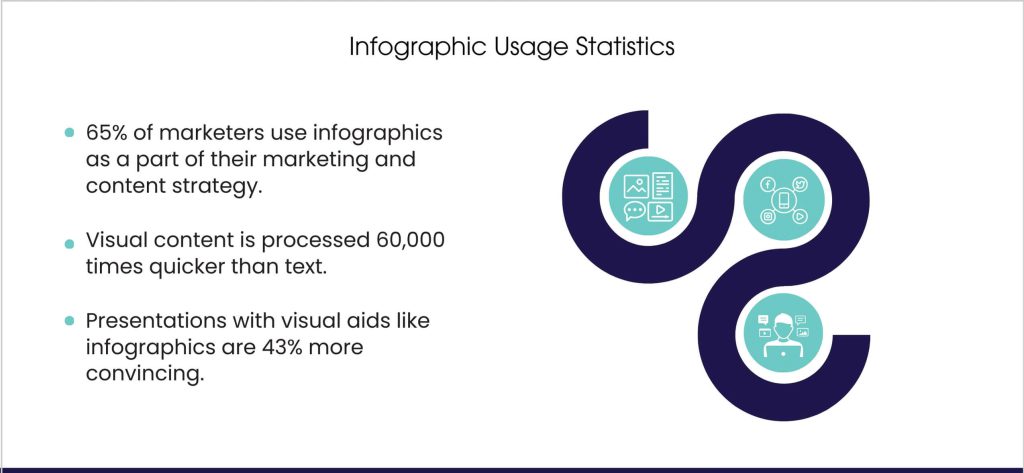
- Context and Captions: Place images near relevant text on the page. Search engines often use the surrounding text to understand an image’s subject. If you have a key image (like an infographic about SEO tips), include a caption or mention the content of the image in the text around it. Captions (the little text under images) are actually some of the most-read content by users, so if it makes sense, add them – they can improve engagement and provide another SEO cue.
- Lazy Loading (when appropriate): For pages with many images (like a gallery), consider implementing lazy loading – images below the fold load only as the user scrolls down. This improves initial load time. However, ensure that lazy-loaded images still get indexed; use proper
noscripttags or other techniques so Googlebot can still fetch them. Also, for critical above-the-fold images (like a banner), load them normally for user experience. - Leverage Image Search Traffic: Many people search directly in Google Images. If your images are optimized, you might capture that traffic. For instance, someone might search for “infographic web visibility tips” and find your image, which can lead them to your site. Infographics, diagrams, product photos, etc., can all pull in visitors via image search. To capitalize, ensure your images are on pages with informative titles and context (Google often shows the page title in image search results), and that clicking the image leads to a valuable page (so users stick around).
- Avoid SEO-unfriendly image text: If you have important text, don’t embed it in images without a very good reason. Search engines can’t read text in images (aside from some OCR capabilities, but don’t rely on that). For example, if you have a banner with a slogan or key info, also put that text in HTML on the page. Images as content should supplement text content, not replace it entirely in most cases.
By making image optimization a standard part of your SEO workflow, you ensure that your site is both user-friendly and search-friendly. Fast-loading, well-described images improve page experience scores and accessibility, and they open additional discovery channels.
Plus, in an era where visual search is on the rise (think Google Lens and Pinterest Lens, where people search using images), having well-optimized images could set you ahead of competitors who ignore them.
13. Use Google Ads
While most of our focus has been on organic (unpaid) methods to boost visibility, it’s worth noting that Google Ads (formerly AdWords) can also play a role in improving your overall web page visibility. Google Ads allows you to display paid listings at the top (or bottom) of search results for your chosen keywords.
This doesn’t directly improve your organic rankings, but it can complement your SEO efforts and yield immediate visibility in ways SEO sometimes cannot (especially for new sites or very competitive terms).
Here’s how leveraging Google Ads can help:
- Immediate Presence for Tough Keywords: SEO can take time, especially for highly competitive keywords. If there are important terms where you’re struggling to rank organically (or while you’re waiting for SEO to kick in), running a targeted ad campaign for those terms can get you immediate exposure on page one. For example, a new e-commerce site might not rank right away for “buy wireless headphones” due to established competitors, but with Google Ads, it can appear at the top as a sponsored result for that query.
- Increased Click Opportunities: Owning both an ad and an organic listing on the same page can reinforce your brand’s presence and increase the chance a user clicks somewhere on your content. Some studies suggest that having a paid and organic result together yields higher combined clicks than either alone. It’s like occupying more real estate on the SERP.
- Geo-targeting and Niche Targeting: Google Ads is very flexible. You can show ads only to people in certain locations, on specific days/times, or on certain devices. If your goal is to attract, say, local mobile users during business hours, you can do that. This precision targeting ensures the right eyes see your page at the right time, boosting the quality of traffic and likelihood of conversions.
- Testing and Data for SEO: Running ads can provide valuable keyword data and a testing ground for titles/descriptions. For instance, you can A/B test different ad headlines and see which gets more clicks – those insights could inform how you craft your meta titles for organic SEO. Similarly, through Ads’ search term reports, you might discover new keywords people use that you hadn’t targeted with SEO yet (these could be added to your content or targeted with new pages).
- Remarketing Ads: Google Ads isn’t just search text ads. You can use remarketing display ads to show image banners to people who visited your site but didn’t convert, as they browse other websites. This keeps your brand visible and can lure visitors back to your site to complete an action. While this is more about conversion optimization, it does increase your overall brand visibility on the web.
- Promoting Content for Links/Engagement: You can even use Google Ads (or other ad platforms) to promote your high-value content – like a free tool, a comprehensive guide, or an infographic. By driving more traffic to that content, you increase the chances of it being shared or linked to, which in turn helps SEO. Essentially, a short-term ad spend can seed longer-term organic gains if the content is link-worthy.
- Budget Control and ROI: One great thing about Google Ads is that you have control over budget and can measure ROI very clearly. Set a comfortable daily budget and target cost-per-click (CPC) that makes sense for your margins. Monitor results – if you’re selling something, you can calculate if the ad spend is profitable via conversions. If you’re just seeking visibility, track metrics like click-through rate and impressions to gauge if the ads are effective in drawing interest.
- Dominating Branded Searches: Competitors might bid on your brand name as a keyword (common in some industries). Running your own brand ads ensures you dominate the results when someone searches your brand, preventing others from potentially stealing those clicks with a well-placed ad. It also lets you control the messaging, maybe highlighting a special offer or key selling point right at the top.
It’s important to note that using Google Ads is a paid strategy – unlike the other mostly free (aside from time/effort) strategies listed. It requires investment, and not every click turns into a lead or sale.
However, when done right, it’s a powerful complement to SEO: SEO often yields higher long-term ROI but takes time, while Ads can yield immediate traffic but stop when the budget stops. Combining them can cover short-term and long-term visibility goals.
For example, many businesses use ads for immediate lead gen and to bolster presence for critical keywords, while simultaneously working on SEO so that eventually they might reduce ad spend once organic picks up.
14. Improve Customer Experience
You might wonder, how does customer experience tie into web page visibility? The answer lies in the increasingly strong alignment between user experience (UX) and SEO.
Search engines are getting better at measuring how users interact with your site – metrics like bounce rate, dwell time (how long someone stays on your page), and pogo-sticking (jumping back and forth between search results) can indirectly influence rankings.
A positive site experience also leads to more sharing, returning visitors, and conversions, which all support your visibility and business growth.
Improving “customer” or user experience on your site involves several factors:
- Page Design and Usability: Ensure your site is easy to navigate and pleasing to the eye. A clean, professional design builds trust. Use clear calls-to-action (like “Contact Us” or “Add to Cart” buttons) that stand out. Make sure menus are logical, and it’s always obvious to users where they are on your site (breadcrumbs can help with that). Avoid clutter and pop-up overload. In short, make it simple for visitors to find what they’re looking for.
- Relevant and High-Quality Content: We’ve covered content in depth, but from a UX perspective – always deliver on what was promised. If your title or meta description sets an expectation, your page should fulfill it. Thin content or pages that are clickbait-y but don’t provide value will frustrate users, causing them to bounce (and likely not return). On the other hand, rich content that answers their questions will encourage them to stay longer and possibly explore more pages.
- Site Speed and Technical Smoothness: This overlaps with technical SEO, but it’s undeniably a user experience factor. People hate waiting. If your site loads slowly or interactions lag, visitors may leave prematurely. Similarly, broken links or error pages create a bad impression – audit your site for these regularly and fix them (or use custom 404 pages that at least guide users back in the right direction). A smooth, fast, error-free experience makes users happy and likely to continue engaging with your content.
- Mobile and Cross-Device Experience: As discussed in mobile optimization, a seamless experience across devices is key. If a user has a great experience on desktop but later visits on mobile and finds it cumbersome, you might lose them. Consistency and optimization for all device types ensure you don’t alienate any portion of your audience.
- Engagement Features: Consider features that increase engagement. Allow comments on blog posts (if you can moderate them) so users can ask questions or discuss – this can increase time on page and add user-generated content (which can even contain long-tail keywords). Integrate social sharing buttons to encourage them to share content they like. If appropriate, add interactive elements like quizzes, polls, or videos to keep users interacting. The more a user interacts, the stronger the signal that they found what they need (which search engines like to see).
- Accessibility: A truly good customer experience is one that everyone can enjoy. Follow web accessibility guidelines (like the WCAG). This includes using proper heading structures, alt text on images (which we covered), captions on videos, high-contrast text for readability, and making sure the site is navigable by keyboard. Not only does this broaden your audience (people with disabilities, or even people on devices like screenless browsers), but some accessibility improvements overlap with SEO best practices (like alt text). Plus, it demonstrates professionalism and care.
- Reduced Bounce Rates: If a large portion of users leave your site after viewing one page (bounce), especially if they leave quickly, it can indicate a mismatch between what they expected and what they got. By improving content relevance, design, and loading speed, you can reduce bounce rate. A lower bounce rate (and higher time-on-site) suggests to Google that users are finding your page useful for the query they searched, which can positively influence rankings.
- Customer Service Elements: Depending on your site, offering live chat, clear contact info, FAQs, or support resources can greatly enhance trust and user satisfaction. For example, an e-commerce site that provides quick customer support or easy returns info on the site is likely to convert and retain more customers than one that hides its contact info. Satisfied customers might leave good reviews (helping SEO as discussed), and they are more likely to come back or recommend you, indirectly boosting traffic.
- Keep Content Up-to-Date: A user finds your page, but all the references are from 2015 – that’s a poor experience if they needed current info. Regularly update key pages (and show a “last updated” date if applicable) to reassure visitors that the information is current. This especially matters for content like “best tools in 2025” or advice that changes over time.
At its core, Google’s algorithm increasingly prioritizes sites that deliver a great user experience. With updates focusing on Core Web Vitals and overall page experience, it’s clear that how a user perceives your site is tightly woven into SEO.
Also, consider the secondary effects: a user who loves your site might bookmark it, spend more time on it, sign up for your newsletter, or link to it from their own blog. All these help visibility in the long run.
Think of SEO not as optimizing for just a bot, but for the end-user whom the bot is trying to please. When you make real human visitors happy, you’re aligning with what search engines want to promote.
So, invest in user experience – it transforms visitors into engaged readers or customers, and it sends all the right signals to search engines that your site is one that deserves to be seen.
15. Leverage Small SEO Opportunities
In addition to the big wins we’ve discussed, there are numerous small SEO opportunities and tactics that, while minor on their own, can collectively give you an extra edge.
These are often quick fixes or optimizations that site owners overlook, but they can contribute to improved visibility. Think of them as low-hanging fruit or “quick wins” in the SEO world. Let’s highlight some of these:
- Optimize Meta Tags on All Pages: Ensure every page – even those not part of your main content strategy (like older blog posts, category pages, etc.) – has a unique and descriptive title and meta description. It’s easy to set and forget meta tags, but doing a sweep to improve ones that are weak or duplicate can improve your overall site’s click-through rates and avoid any potential duplicate title issues.
- Fix Broken Links (Internal and External): Broken links harm user experience and can waste crawl budget. Use tools or crawlers to find any 404 links on your site. Fix internal ones by updating to the correct URL. For broken external links (outbound links to other sites), either remove them, update them if the resource moved, or replace them with a similar resource. While this might not boost rankings directly, it keeps your site polished and user-friendly.
- Internal Linking Optimizations: We spoke about adding internal links, but also look at your anchor text. Are you linking using generic text like “click here” frequently? If so, update some of those to be keyword-rich descriptors of the target page (without over-optimizing). Also, identify any orphan pages (pages with no internal links pointing to them) and link to them from relevant pages so that they’re properly in the site’s link graph.
- Refresh Outdated Content: If you have content that’s old but still getting some traffic (or could, with a boost), update it. This might involve updating facts, adding new sections, improving readability, or incorporating new target keywords. After updating, you can even re-promote it (and change the publish date if appropriate). This “content relaunch” strategy can revive pages that had faded in rankings.
- Schema Markup in Small Ways: We discussed major schema types (like FAQ or local business), but there are other micro-opportunities. For example, adding
BreadcrumbLista schema if your site uses breadcrumbs, orArticleschema on blog posts. These might not instantly transform your visibility, but they help ensure search engines fully understand your site and sometimes can enhance how your result appears (breadcrumbs can show in Google results, which is nice). - Image Filenames and Title attributes: Beyond alt text, ensuring each image filename and optional title attribute are descriptive is a tiny tweak that reinforces context. For instance, instead of an image named “
DC0003.jpg“, useteam-meeting-digital-agency.jpgfor a team meeting photo on your about page. It’s minor, but every bit of context can help with image SEO. - Use of Header Tags: Audit your pages to see that you are using header tags (H1, H2, H3, etc.) in a hierarchical, keyword-conscious way. Sometimes, a small change like turning a bolded subheading into a proper H2 can help Google understand the page structure better. Also, only one H1 per page (usually the title), and use subheadings liberally to break content (good for users and SEO).
- Canonicalization: Ensure your pages have correct canonical tags where needed, especially if you have somewhat duplicate content or parameters. For example, if your site is accessible with and without “www” or on both http and https, canonical tags (and proper redirects) ensure you don’t split SEO signals. Another scenario is e-commerce sites with sort or filter URLs – canonicals should point to the main version of the page.
- Utilize Analytics and Search Console Data: A quick win can come from analyzing what keywords you’re almost doing well on. Search Console shows queries where you rank, e.g., 8th or 12th. Identifying those and slightly tweaking the page (maybe a bit more content about that subtopic, or a better title) could bump you to page 1. Low-hanging fruit keywords often reside in positions 11-20 – a little nudge can sometimes bring them into the top 10.
- Improve HTML and Sitemap cleanliness: For instance, have an HTML sitemap for users (if your site is large) so nothing is too buried. Check that your XML sitemap is updated and only includes canonical, indexable URLs (no broken or redirected URLs). These housekeeping tasks ensure crawl space efficiency.
- Monitor Competitor Changes: Sometimes, a small opportunity arises when a competitor’s page goes down or they change something. Using tools that alert you to competitor ranking drops, you might seize an opening by boosting content on a related page of yours. Or simply see what small tactics they’re using that you aren’t (like a certain schema type or a content format) and experiment with it.
- Page Snippets and Formatting: If a page has a lot of text, adding a quick table of contents (with anchor links) can improve UX and may even get you jump links in SERPs. Likewise, using bullet points or numbered lists for steps (where appropriate) can get you featured snippet opportunities. These are minor content formatting tweaks that align with how Google sometimes displays info.
- Regular Site Health Checks: Doing periodic “SEO health” audits can surface small issues like missing meta descriptions, multiple H1s, slow-loading elements on a page, etc. Each by itself might not be huge, but collectively fixing them leads to a healthier, more optimized site.
Leveraging these small opportunities is about being thorough and detail-oriented. In competitive SEO, marginal gains add up. If each minor tweak gives you a 1% improvement, ten tweaks could be a 10% improvement – which might be the difference between ranking #4 and #1.
Importantly, these quick wins are usually easy to implement (often not requiring major dev work or content overhauls). They’re the polish on top of your broader strategy.
Once you’ve handled the major items (like quality content, site speed, etc.), spending time on these finer points can squeeze out extra performance that competitors might miss.
Conclusion
Improving web page visibility is not a one-time hack but a multifaceted, ongoing effort. We’ve covered 15 powerful solutions – from mastering SEO fundamentals like keyword optimization and content quality, to tapping into advanced tactics like schema markup and leveraging paid ads.
Each strategy plays a role in making your pages more discoverable and appealing in search results. Implementing these steps will help you in many ways:
- Higher Rankings: Through solid on-page SEO, technical excellence, and authoritative backlinks, your pages can climb higher on SERPs, putting you in front of more eyes.
- Broader Presence: By creating more content, optimizing for local search, and distributing your material across channels, you’ll cast a wider net to capture various segments of your audience.
- Better Click-Through Rates: With SERP optimizations, compelling titles/meta descriptions, and rich snippets, more searchers will choose your result over the competition, bringing you more traffic without even needing higher rankings.
- Enhanced User Satisfaction: By focusing on mobile optimization, site speed, and user experience, visitors will stay longer and engage more – sending positive signals to search engines and increasing the chances they convert into customers.
- Staying Competitive: SEO is dynamic. Competitors are likely working on these areas too. By proactively utilizing every tool and opportunity (even the small ones), you ensure you’re not just keeping up but ideally surpassing others in your space.
Remember, the ultimate goal is to connect with your target audience. Search engines are simply the bridge. When you optimize your site for visibility, what you’re really doing is making it easier for people to find value in what you offer.
And when they do find that value – whether it’s a useful answer, a great product, or a helpful service – you gain their trust, engagement, and business.
Take a step-by-step approach: you don’t have to do all 15 at once. Assess which areas are your weakest and tackle those first. Maybe your site is technically sound, but lacks content – start with content creation.
Or perhaps you have great articles that no one sees – focus on distribution and link building. Over time, aim to cover all these strategies for a comprehensive improvement.
By setting a clear strategy, optimizing diligently, and continually refining based on data and user feedback, you’ll see your web pages rise in visibility. And as visibility grows, so will the opportunities – more traffic, more customers, and more growth for your business or project.
Stay patient and persistent. SEO gains often snowball: a few small wins turn into larger wins as authority builds and word-of-mouth spreads. The effort you put in now can pay dividends long into the future, keeping your pages prominently visible.





Responses